

What Is Android Auto and How Does It Enhance Driving?
Android Auto is a technology that brings the power of your smartphone into your car, offering easy access to apps, navigation, and hands-free controls. Designed for drivers, it ensures that they can stay connected while remaining focused on the road. By integrating various services into your vehicle, Android Auto provides convenience and safety, making every journey smarter and more enjoyable. This article explores the features, benefits, and setup of Android Auto, as well as its potential future.
What Is Android Auto?
Key Features of Android Auto
Android Auto boasts several key features that transform your car into a smart vehicle. It offers hands-free voice control for calling, texting, and navigating. You can easily access Google Maps for real-time navigation or use voice commands to stream music and podcasts from popular apps. The interface is designed to minimize distractions, with large, easy-to-read icons and intuitive touch controls. It also supports third-party apps, providing a more personalized and tailored experience for every driver.
How Android Auto Works with Your Car
Android Auto connects to your car through a USB cable or wirelessly, depending on your vehicle’s compatibility. Once connected, the interface from your phone appears on your car’s display screen. You can then use the touchscreen or voice commands to control the apps and functions you need. Your car’s infotainment system acts as the central hub for managing Android Auto. Some cars also offer dedicated Android Auto buttons for quick access, simplifying the interaction and enhancing the convenience of use.
Benefits of Android Auto for Drivers
Hands-Free Control for Safer Driving
One of the most valuable benefits of Android Auto is its hands-free functionality. By using voice commands, drivers can make calls, send messages, and even navigate without needing to touch their phone. This reduces distractions and promotes safer driving practices. With features like Google Assistant, drivers can easily manage their tasks while keeping their focus on the road, leading to a safer and more efficient driving experience.
Seamless Integration with Popular Apps
Android Auto makes it easy to integrate a wide range of popular apps, from navigation tools like Google Maps to music streaming services such as Spotify. The seamless integration ensures that drivers have access to the apps they use most frequently without needing to switch between their phone and car interface. This creates a cohesive driving experience, allowing drivers to enjoy their favorite services while maintaining full control of the vehicle.
Enhanced Navigation and Real-Time Updates
With Android Auto, drivers can rely on Google Maps for turn-by-turn navigation, real-time traffic updates, and alternative route suggestions. This helps drivers avoid delays, stay on track, and reach their destination more efficiently. Additionally, the integration with Google Assistant enables hands-free route adjustments, further improving the driving experience. Whether you’re commuting or on a road trip, Android Auto ensures that you are always equipped with the latest navigation information.
Setting Up and Using Android Auto
Initial Setup Steps
To get started with Android Auto, make sure your phone and car are compatible with the technology. You’ll need to install the Android Auto app from the Google Play Store if it’s not pre-installed on your phone. Once installed, connect your phone to the car’s infotainment system using a USB cable or through Bluetooth, depending on your car’s capabilities. Follow the prompts on your phone and vehicle screen to complete the setup, ensuring that all permissions are granted.
Connecting Android Auto with Your Car
To connect Android Auto to your car, plug your phone into the car’s USB port using a high-quality cable or enable wireless Android Auto if your vehicle supports it. Ensure that your car’s infotainment system is in the right mode to accept the connection. You may need to select Android Auto as the source on your car’s display. Once the connection is established, your phone’s apps will appear on your car’s screen, allowing you to control them using either the touchscreen or voice commands.
Troubleshooting Common Issues
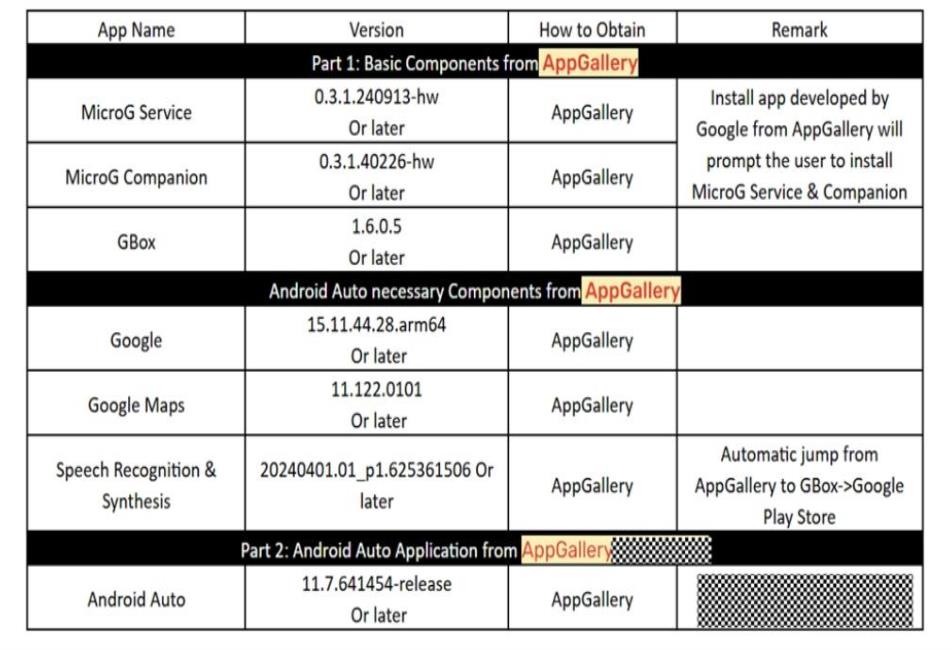
If you encounter problems with Android Auto, there are a few common issues to check. For example, if your Huawei phone isn’t working with Android Auto, ensure that you have properly installed all necessary components, such as MicroG Service and Google Play Store, from the AppGallery. Additionally, verify that your device’s settings allow for third-party apps and location permissions. If huawei Android Auto not working persists, try restarting your phone and checking whether all permissions are granted to apps like Google Maps, MicroG, and GBox.
Android Auto’s Future: What’s Next for Driving Tech?
Upcoming Features and Updates
In the coming years, Android Auto is expected to introduce new features aimed at enhancing usability and safety. Updates may include better integration with autonomous driving technology, expanded voice control capabilities, and even more app options. Android Auto is likely to evolve alongside vehicle technology, offering a more intuitive and smarter way to interact with your car while keeping your focus on the road.
The Role of AI in Enhancing Android Auto
Artificial intelligence (AI) will play an increasingly important role in enhancing Android Auto. AI could enable predictive features, such as anticipating your route based on your calendar, traffic patterns, and personal preferences. With AI integration, Android Auto could also improve voice recognition and assist with more complex tasks, such as managing multiple apps simultaneously. This makes Android Auto an even smarter and more helpful tool for modern drivers.
The Growing Ecosystem of In-Car Tech
As Android Auto continues to grow, it will become part of an expanding ecosystem of in-car technology. The integration of Android Auto with other in-car systems like infotainment, climate control, and autonomous driving will make driving more seamless and enjoyable. Future developments could also see better compatibility with non-Android devices, allowing a wider range of users to benefit from Android Auto’s features and innovations.
Conclusion
Android Auto is a transformative technology that enhances the driving experience by providing easy access to essential apps, navigation, and hands-free controls. Its key features, such as voice commands and seamless integration with popular apps, make it a valuable tool for modern drivers. With ongoing updates and improvements, Android Auto will continue to evolve, offering even smarter features for safer and more enjoyable drives. It’s clear that Android Auto is the future of in-car technology, bringing convenience and intelligence to every journey.